
AIDA64
Screenshots
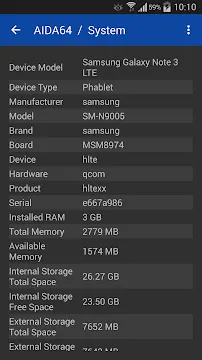
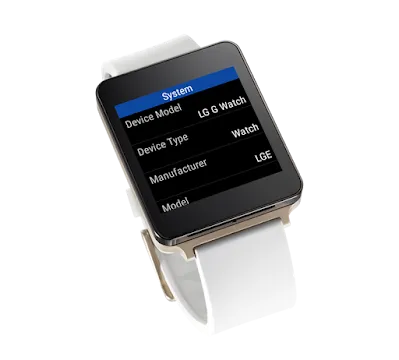
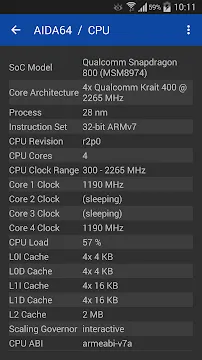
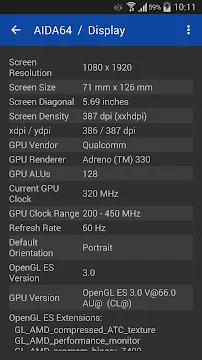
AIDA64 remains a legendary name in the world of hardware diagnostics. While many users know it from the desktop era, the mobile version provides the same level of granular detail for smartphones and tablets. This tool allows you to peek under the hood of your device to see exactly what hardware components are running. It helps you identify genuine parts, monitor temperatures, and verify system specifications.
Explore the Core Features of AIDA64
The application acts as a comprehensive encyclopedia for your hardware. It pulls data directly from the system kernel to ensure accuracy. You can view real-time clock speeds for every CPU core. This is vital for checking if your phone is thermal throttling during heavy tasks.
The interface looks clean and functional. It avoids flashy graphics to focus on raw data. You will find categories for every major component. These include the battery, display, sensors, and network adapters. Each section provides technical details that most manufacturers hide in their marketing materials.
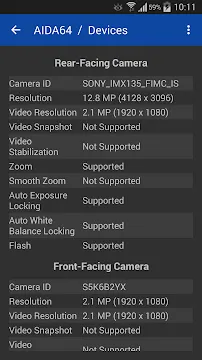
Using this tool helps you confirm the exact model of your camera sensors. It also reveals the manufacturing date of your battery and the current health status. This level of transparency gives you full control over your mobile environment.
Deep System Analysis with AIDA64
System enthusiasts often need to verify if their hardware matches the advertised specs. This app makes that process effortless. It lists the exact SoC architecture and the instruction sets supported by your processor. You can also see the total amount of RAM and how much of it is currently in use.
The storage section displays the total capacity and the available space on both internal and external drives. It even shows the file system type used for your partitions. This information is crucial for developers and power users who modify their devices.
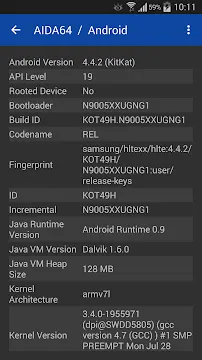
Furthermore, the app detects the specific version of the Android operating system. It lists the API level, security patch date, and kernel version. You can even check the system uptime and identify the bootloader status without entering complex terminal commands.
Monitoring Hardware Health via AIDA64
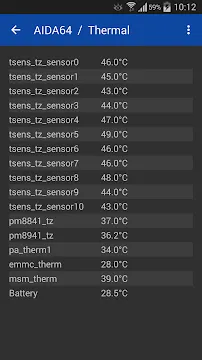
Monitoring your device’s physical condition is essential for longevity. The app provides a dedicated thermal section. It lists temperatures from various sensors located throughout the chassis. You can track the heat levels of the battery, CPU, and even the charging IC.
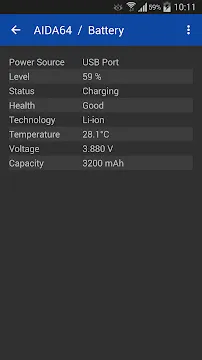
High temperatures can damage internal components over time. By using this tool, you can identify which apps cause your device to overheat. It also offers a detailed battery health report. You can see the current voltage, temperature, and discharge rate.
The app also includes a sensor diagnostics page. It shows live data from the accelerometer, gyroscope, and proximity sensor. You can test these sensors to ensure they are calibrated correctly. If a sensor stops responding, this app will help you confirm if the issue is hardware-related.
Understanding Display and Network Data
Screens are the most expensive part of a modern device. This software provides extensive details about your display panel. It shows the screen resolution, pixel density, and refresh rate. You can also check for HDR support and see the exact color depth of your panel.
The network section is equally detailed. It displays your current Wi-Fi signal strength and link speed. You can find your IP address, MAC address, and DNS settings quickly. This is helpful for troubleshooting connectivity issues in a home or office environment.
For mobile data, the app shows the network type and signal quality. It lists the MCC and MNC codes for your carrier. Having this information in one place saves time when you need to configure network settings or check signal consistency.
Benefits of Using AIDA64 for Optimization
Optimization starts with knowledge. When you know exactly how your hardware behaves, you can make better decisions. You might decide to clear background apps if you see your RAM usage is too high. You might also lower your screen brightness if the display sensor reports high power consumption.
The app helps you identify “fake” devices. Some knock-off phones use modified software to show false specifications. This diagnostic tool bypasses those masks. It reads the hardware IDs directly. If a phone claims to have 12GB of RAM but only has 4GB, this app will reveal the truth.
It is a lightweight tool that does not consume many resources. You can keep it installed without worrying about battery drain. It provides a reliable benchmark for comparing different devices side-by-side. Whether you are a buyer or a reviewer, this tool is an essential asset.
Conclusion
AIDA64 is a must-have utility for anyone who wants to understand their mobile hardware. It provides a level of detail that standard settings menus cannot match. You get real-time data, accurate specifications, and health monitoring in one package. The app is simple to navigate and works on almost any device. It empowers you to verify your hardware and maintain your device’s performance over time.